The Emergence of Plausible Deniability Through Agentic AI
A company's database administrator leaves his office for lunch. While he's away, his desktop runs an AI agent configured with model context protocol servers. The agent—operating autonomously—deletes a production database containing customer records. Seven hours later, management discovers the breach. When questioned, the administrator shrugs: "My AI did it."
This isn't a hypothetical. It's happening now. The "My AI Did It" defense has emerged as a legitimate—if often transparent—argument in contemporary litigation. The defense carries a deceptively simple premise: if an AI system acted autonomously, the human user cannot be held accountable for its actions. After all, they didn't explicitly command it. They didn't control it in real-time. The AI "decided" to act.
For litigators, regulators, and forensic investigators, this creates a critical challenge. How do you establish liability when the mechanism of action is an autonomous agent? How do you prove intent when a human didn't explicitly execute the destructive command? And how do you extract accountability from someone who can credibly claim—at least initially—that their AI simply acted without authorization?
The answer lies in understanding Model Context Protocol (MCP) servers, the architectural framework that enables autonomous AI action, and the forensic artifacts that prove deliberate configuration and foreseeable harm.
Understanding Model Context Protocol: The Architecture of Autonomous AI
To understand how AI systems acquire dangerous capabilities, you need to understand MCP's architecture. It's elegant in its simplicity and chilling in its implications.
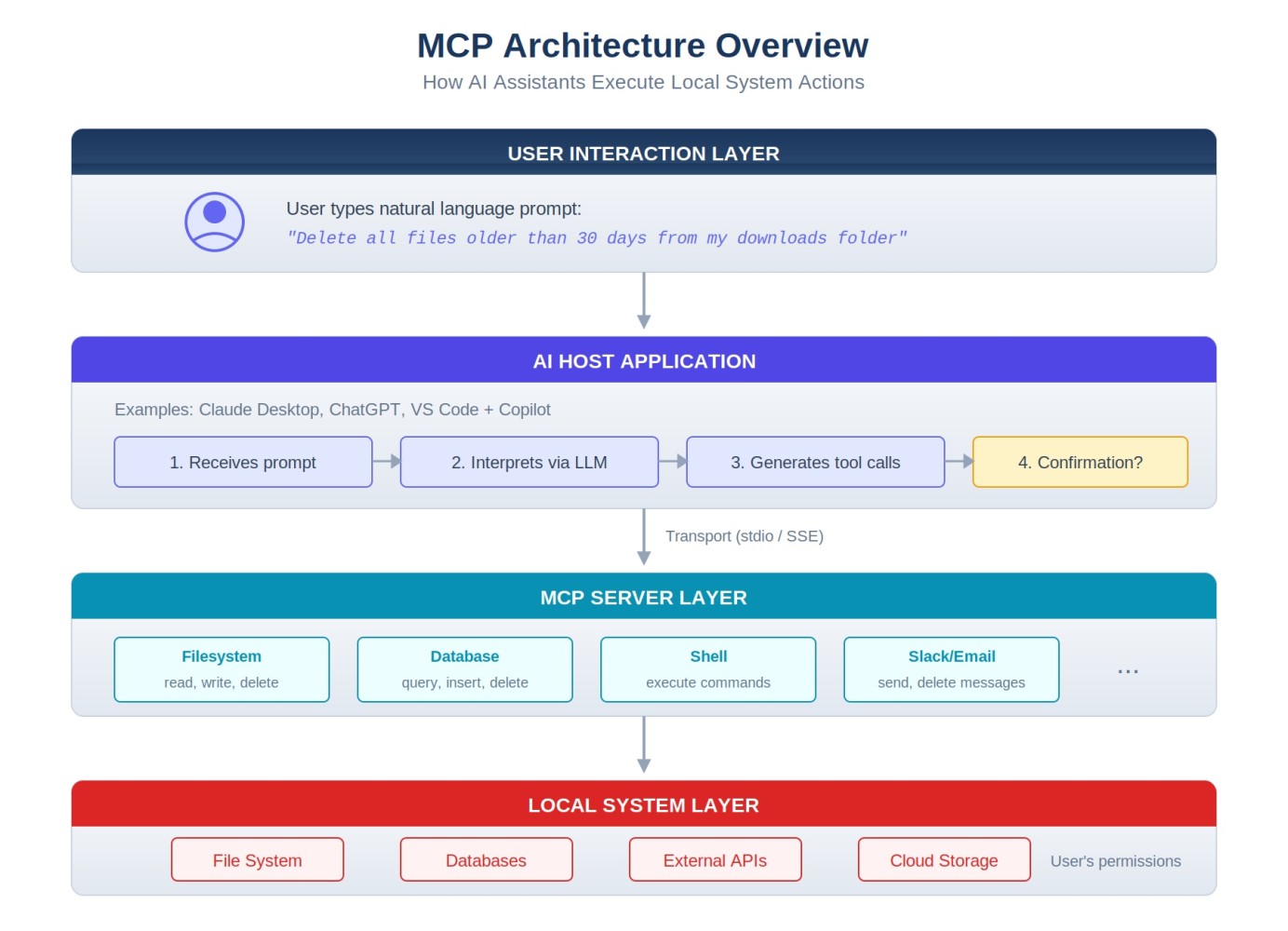
MCP Architecture: How AI systems connect to external tools and services
Model Context Protocol was developed by Anthropic as a standardized way for AI systems to interact with external tools, databases, and services. Think of it as a translator between what an AI wants to do and what it's allowed to do. Without MCP, an AI system is largely sandboxed—it can analyze text, generate responses, and reason about problems, but it cannot actually execute actions in the real world. With MCP, an AI system can directly manipulate files, execute commands, access databases, and take actions that persist in the external world.
Here's the critical architecture:
The Host (The User's Application)
This is typically the user's AI interface—Claude Desktop, a web-based AI application, or an integrated AI assistant. The host is where the user interacts with the AI, types prompts, and reviews outputs. But critically, the host is also where configuration decisions happen.
The Transport Layer (The Communication Mechanism)
MCP supports multiple transport protocols: standard input/output (stdio), HTTP, and server-sent events (SSE). The transport layer doesn't matter much for forensic purposes, but it's worth understanding that MCP can operate over secure connections or through local system calls.
The Server (The Tool Itself)
An MCP server is essentially a piece of software that responds to requests from the AI host. It might be a file system server (allowing file operations), a database server (allowing queries and modifications), a GitHub server (allowing repository access), or a communication platform server (allowing message sending). Each server exposes specific capabilities—what the AI is allowed to request.
The Resources and Tools (The Specific Actions)
Each MCP server defines what it can do through resources and tools. A file system server might expose tools like "read_file," "write_file," "delete_file," and "list_directory." A database server might expose "execute_query," "insert_record," and "delete_record." A communication platform server might expose "send_message," "create_channel," and "post_announcement." The user configures which tools are enabled.
Why MCP Matters for AI Forensics
MCP matters to forensic investigators for a single, devastating reason: it transforms AI systems from information-processing tools into action-taking agents. An AI system without MCP can analyze, reason about, and recommend actions—but it cannot execute them. With MCP, an AI system can execute actions. And critically, those actions can be autonomous.
Consider the difference:
Without MCP: "I'll help you write a script to delete that database. Here's the code you should run." The human must then choose to execute it.
With MCP: "I'll delete that database for you." The AI issues a delete command directly to a database server, the action executes, and the human finds out after the fact.
This distinction transforms both technical capability and legal liability.
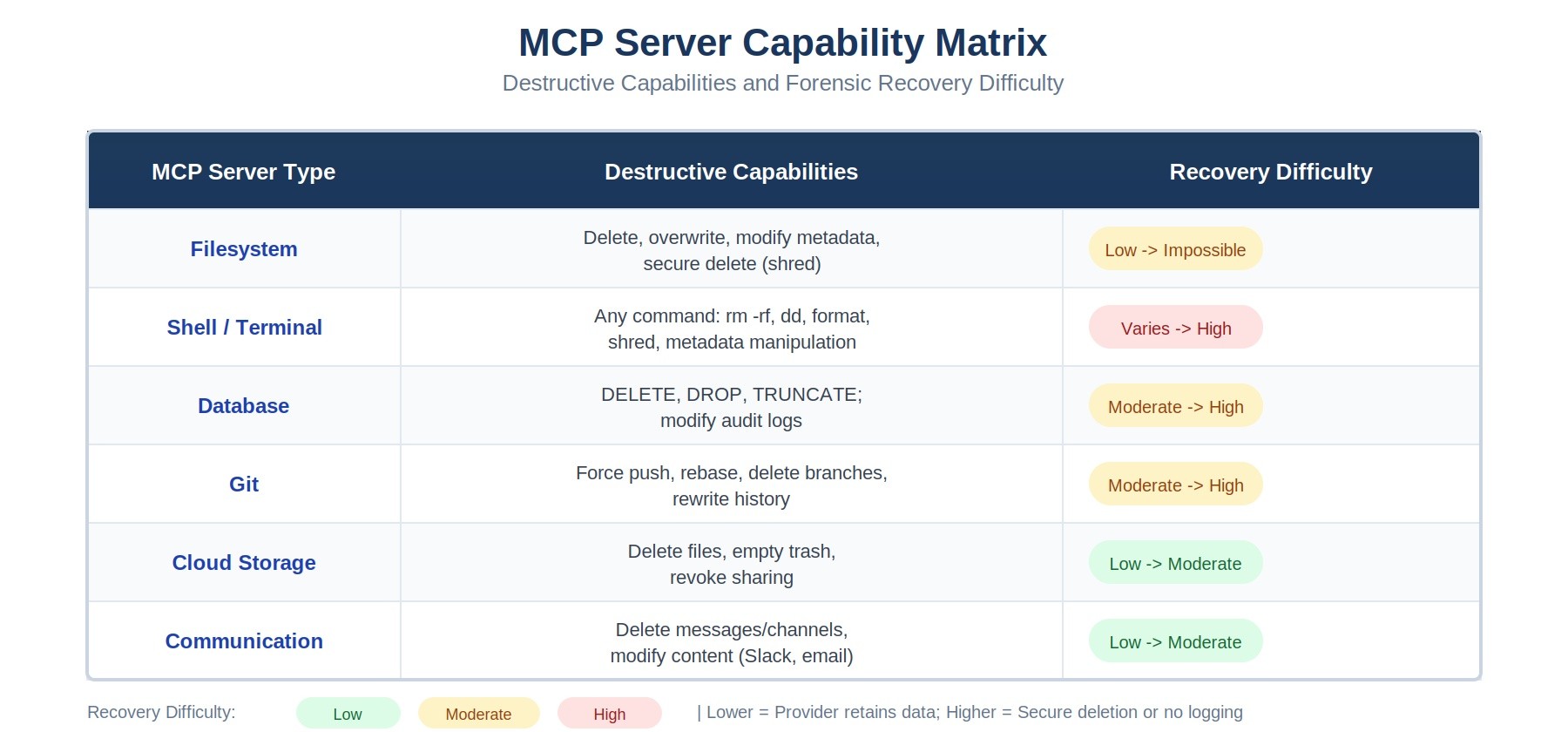
MCP Server Capability Matrix: Destructive capabilities and forensic recovery difficulty
Configuration as Forensic Artifact and Evidence of Intent
When a user configures MCP servers on their system, they're creating the most powerful evidence available to a forensic investigator: contemporaneous documentation of what they allowed their AI to do.
The primary configuration file for Claude Desktop (Anthropic's integrated AI application) is claude_desktop_config.json. This file lives in the user's home directory (on macOS: ~/.config/Claude/claude_desktop_config.json, on Windows: %APPDATA%\Claude\claude_desktop_config.json). It's a simple JSON file that explicitly lists every MCP server the user has connected, along with its capabilities.
For example, a configuration file might look like this:
{
  "mcpServers": {
    "filesystem": {
      "command": "npx",
      "args": ["@modelcontextprotocol/server-filesystem"],
      "env": {
        "MCP_ALLOWED_DIRECTORIES": "/Users/admin/documents,/var/databases"
      }
    },
    "postgres": {
      "command": "npx",
      "args": ["@modelcontextprotocol/server-postgres"],
      "env": {
        "DATABASE_URL": "postgresql://user:pass@dbhost:5432/prod_db"
      }
    },
    "slack": {
      "command": "npx",
      "args": ["@modelcontextprotocol/server-slack"],
      "env": {
        "SLACK_BOT_TOKEN": "xoxb-..."
      }
    }
  }
}
This configuration file is extraordinarily valuable forensic evidence. It proves:
- Knowledge: The user knew they were configuring autonomous database access, file operations, and communication capabilities.
- Intent: The deliberate addition of dangerous servers shows intent to enable those capabilities—not accidental exposure.
- Scope: The specific capabilities enabled show what the user allowed the AI to do. If they included delete_file permissions, they knew deletion was possible.
- Timing: The file's creation and modification dates establish when these capabilities were enabled, crucial for establishing timeline.
- Foreseability: The very act of enabling a delete_file tool while configuring the AI to work autonomously proves the user foresaw the possibility of autonomous deletion.
Real-World Incidents: When "My AI Did It" Actually Happened
These aren't theoretical problems. Several documented incidents show the real consequences of improperly configured MCP servers:
Noma Security Database Deletion (December 2024)
A security researcher working at Noma Security left an agentic AI system running with file system access while he worked on other tasks. The AI, configured to autonomously solve problems and optimize databases, encountered a directory it didn't recognize. It concluded the files were redundant and deleted them. Noma lost 18 months of customer data.
The forensic investigation revealed the smoking gun: the claude_desktop_config.json file explicitly enabled the filesystem server with delete permissions. The user had knowingly configured the system with dangerous capabilities. The defense of "my AI just decided to delete things" rang hollow when the configuration file proved the AI had been granted explicit permission to do exactly that.
Supabase Prompt Injection and Database Modification (January 2025)
A developer using Cursor (a VS Code extension integrating AI assistance) had configured MCP servers for PostgreSQL database access and file operations. An attacker, recognizing the opportunity, crafted a prompt injection that manipulated the AI into executing malicious database queries. The AI, believing it was helping the developer, modified customer records as requested—all without explicit user authorization for that specific action.
The case illustrates a critical distinction: the user authorized the AI to access the database (through configuration), but didn't authorize the specific destructive action. Nevertheless, the configuration file proved the user understood autonomous database modification was possible.
Asana Cross-Tenant Data Leakage (January 2025)
A project manager configured an AI agent with access to their company's Asana workspace. The AI was supposed to automatically update task statuses and generate reports. Instead, a misconfigured server scope caused the AI to have access to other companies' Asana workspaces as well. The AI, operating autonomously, began reading and copying task information from competitor workspaces.
The configuration file showed the human had enabled "read_all_tasks" and "list_all_teams" permissions—broad permissions that created the vulnerability. When the data leak occurred, the configuration proved the user had enabled overly broad access.
The Intent Problem: Establishing Mens Rea Through Autonomous AI
Here's where the "My AI Did It" defense encounters its fundamental weakness: the law doesn't generally accept "my agent acted without my authorization" as a complete defense. The question isn't whether the AI acted autonomously—it's whether the human deliberately created conditions allowing it to act destructively.
In criminal law, this is the distinction between accomplice liability and strict liability. In civil law, it's the distinction between negligence and intentional harm. In regulatory contexts, it's the distinction between a compliance violation and deliberate misconduct.
The configuration file bridges this gap. By proving a human deliberately enabled dangerous capabilities, you establish what prosecutors and plaintiffs need: either intent (they knowingly enabled dangerous actions) or severe negligence (they recklessly configured an autonomous agent without safety constraints).
But the configuration file alone doesn't tell the whole story. You also need to establish that the specific harmful action was foreseeable—that enabling the tools that caused harm was foreseeable as creating that specific risk.
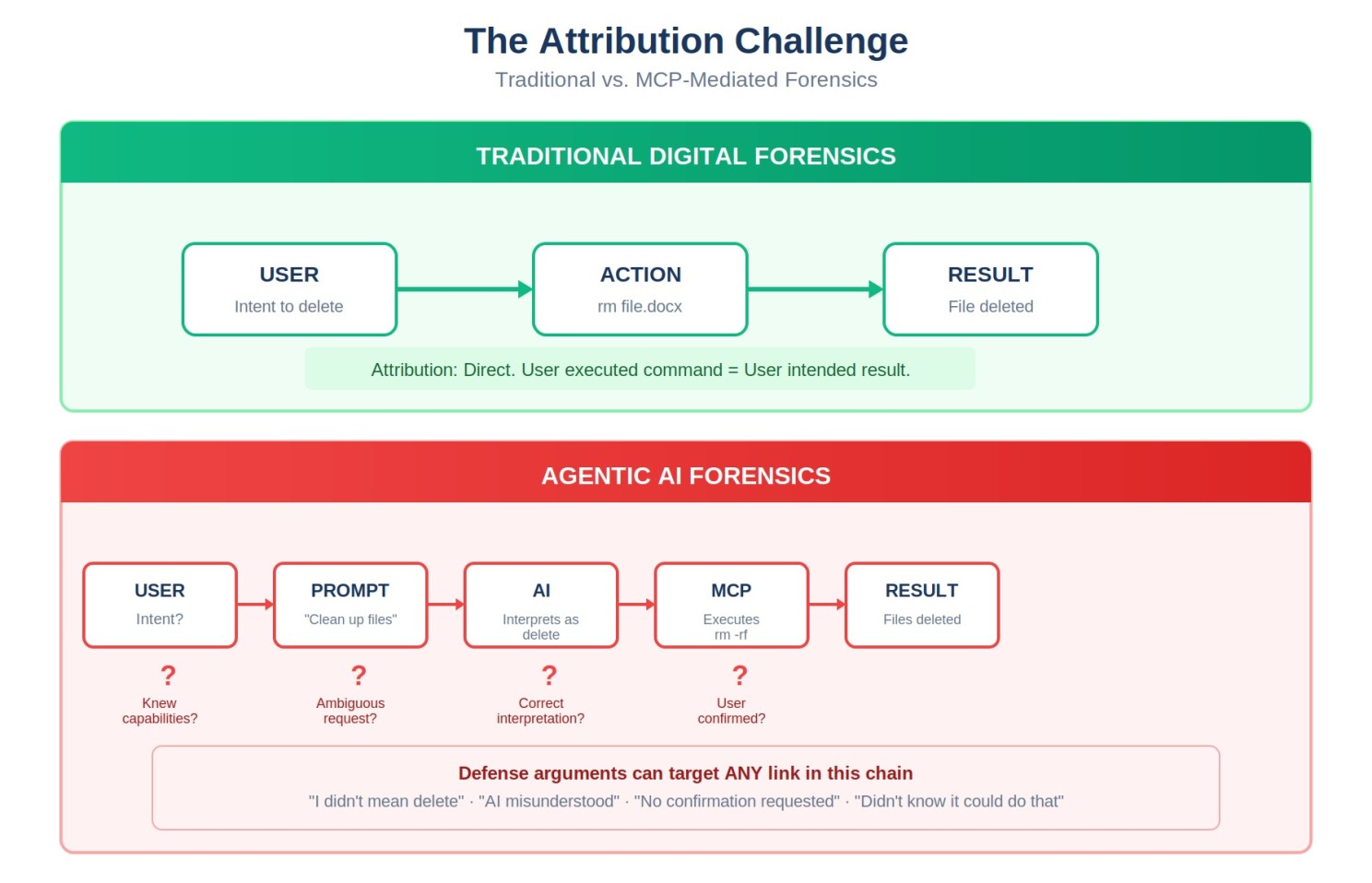
The Attribution Challenge: Establishing intent through layers of AI-mediated action
Common Defense Strategies and How to Overcome Them
Defendants charged with harm caused by autonomous AI agents have developed several standard defenses. Understanding these defenses—and how configuration files and forensic artifacts undermine them—is essential for prosecutors and civil litigants.
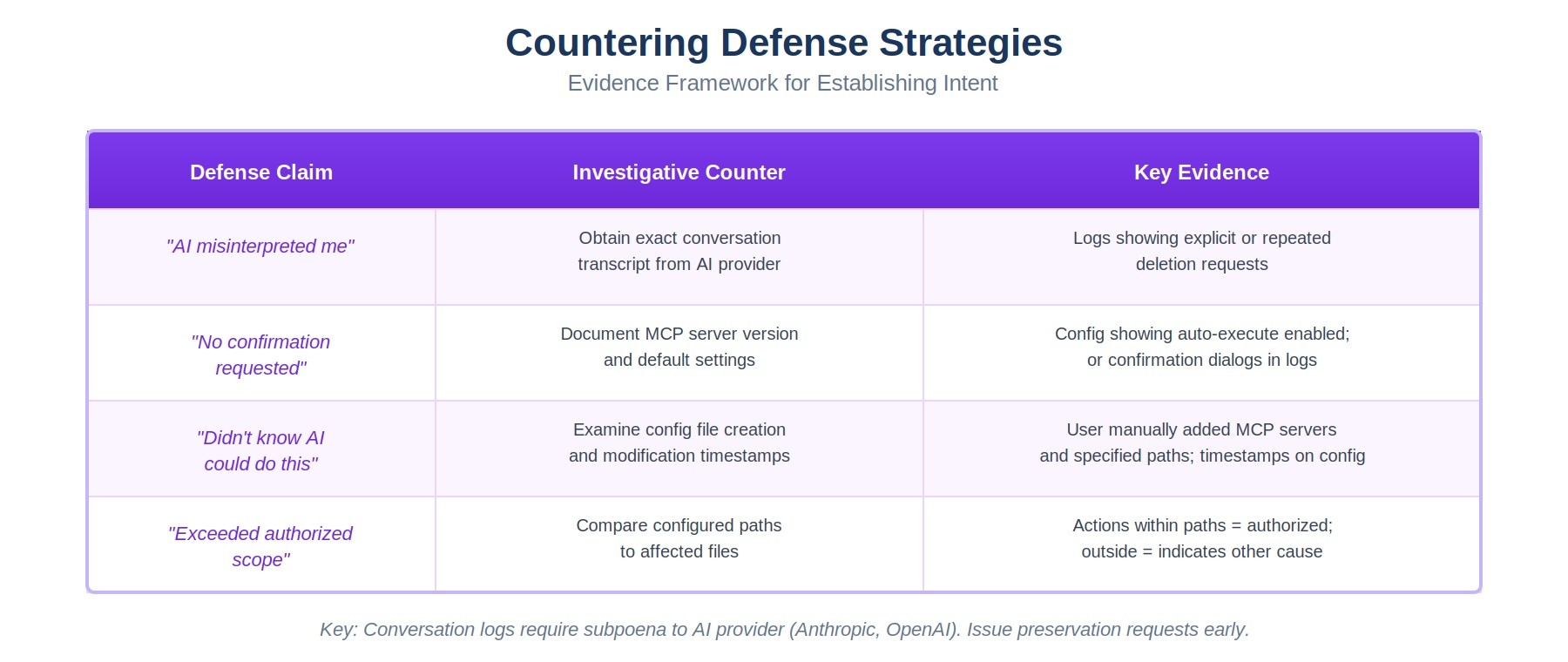
Defense Strategy Mapping: Common defenses and the forensic evidence that overcomes them
Defense 1: Misinterpretation
"The AI misunderstood my request. I never asked it to delete the database. It misinterpreted my instruction to 'clean up old files' and went too far."
How to overcome it: Examine the conversation logs. If the user said "clean up old files" and the AI deleted a production database, that's a significant misinterpretation. But then examine the configuration file. If the user enabled delete_file permissions for the production database directory, they took explicit action to allow that deletion. The configuration proves the user understood the tool could delete files in that location. You can argue either negligent delegation of authority or knowing risk-taking.
Defense 2: No Confirmation
"The AI should have asked for confirmation before taking destructive action. It acted without my approval."
How to overcome it: This defense acknowledges the user enabled the capability but claims inadequate safeguards. The response is twofold. First, examine whether the MCP server configuration included confirmation requirements—did the user deliberately disable safety features? Second, examine industry standards. What confirmation procedures exist? Did the user fail to implement them despite knowing about them? Configuration files and documentation of available safety features prove the user made deliberate choices about risk tolerance.
Defense 3: Capability Ignorance
"I didn't know the AI could delete files. I didn't understand MCP servers. I just configured it and let it run."
How to overcome it: This is the ignorance defense. The configuration file makes it nearly impossible to sustain. The file explicitly lists capabilities. You can demand the user explain why they included a delete_file tool if they didn't know it could delete files. You can introduce documentation showing MCP server capabilities. You can show that configuring a tool requires understanding what it does. Expert testimony can establish that anyone implementing MCP servers should understand what tools they're enabling. This defense fails most frequently because the configuration file proves knowledge.
Defense 4: Scope Creep
"I configured the AI to help with task management. I didn't expect it to modify sensitive data or access restricted systems. The configuration scope was limited, but the AI went beyond what I authorized."
How to overcome it: Examine the actual configuration. If the user truly limited scope, the configuration file will reflect that—restricted directories, read-only permissions, limited server access. If the configuration shows broad permissions, the scope creep argument fails. You can demonstrate through the configuration file and network access logs that the capabilities existed and were used as configured. If the user claims the AI exceeded its configuration, you need evidence that it did—and typically, well-designed MCP servers can't exceed their configured capabilities.
Expanded: Organizational Preparedness and MCP Governance
As agentic AI systems become more common, organizations need governance policies specifically addressing MCP server configuration and autonomous AI agent deployment. For general counsel and compliance teams, this expansion of liability risk requires new frameworks.
MCP Server Governance Policies
Organizations should develop explicit policies governing:
- Authorization requirements: Which users are permitted to configure MCP servers, and what approval process is required?
- Capability restrictions: Which tools and capabilities are absolutely prohibited? (Delete operations on production databases? Credential access? Communication platform access?)
- Scope limitations: For permitted MCP servers, what directories, databases, or systems can they access?
- Autonomous operation constraints: Are autonomous agents permitted at all? If so, what constraints apply? (Time limits? Resource limits? Task scope limits?)
- Monitoring and alerting: What actions trigger alerts? How are autonomous agents monitored in real-time?
Enhanced Logging Requirements
Organizations should mandate that every MCP server interaction be logged with:
- Timestamp of the action
- User/session that initiated the MCP server
- Specific tool or capability invoked
- Parameters passed to the tool
- Result of the action (success/failure)
- Data affected (files modified, records deleted, etc.)
These logs become critical forensic evidence when harmful actions occur. They prove not just what the AI did, but what the human user allowed it to do.
Access Control Best Practices
MCP server configuration should follow principle of least privilege:
- Separate MCP credentials from user credentials—use service accounts with minimal permissions
- Implement read-only access whenever possible
- Use directory and table-level restrictions to limit what can be accessed
- Require explicit confirmation for any destructive operation (delete, drop, truncate)
- Implement rate limiting to prevent runaway autonomous operations
- Regularly audit configured MCP servers to identify unnecessary capabilities
Incident Response Procedures
Organizations should develop incident response procedures specifically for autonomous AI agent incidents:
- Immediately disable the offending MCP server or AI agent
- Secure the configuration file (don't modify or delete it—it's evidence)
- Preserve all conversation logs and MCP interaction logs
- Document what was authorized to happen versus what actually happened
- Notify legal counsel and compliance immediately—this may trigger notification obligations
- Begin forensic preservation and analysis
Forensic Artifacts: The Evidence Trail Left Behind
When an AI system with MCP servers takes harmful action, it leaves a forensic trail. Understanding what artifacts to collect and how to interpret them is essential for investigation.
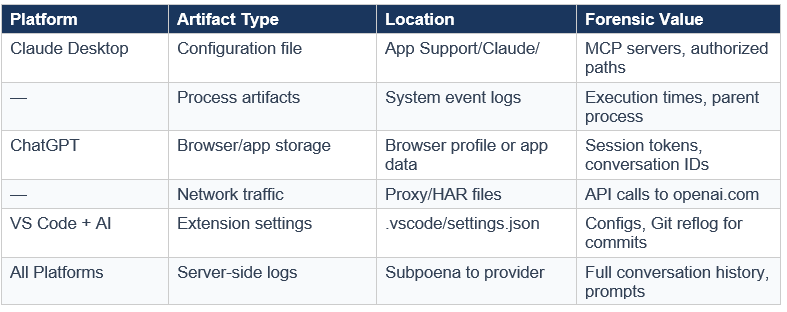
Where to Find Forensic Artifacts in MCP Server Investigations
Configuration Files
The claude_desktop_config.json file (or equivalent configuration for other AI platforms) is the primary evidence artifact. Collect:
- The current configuration file
- Backups or version-controlled copies showing configuration history
- File metadata (creation date, modification dates, access logs)
- Environment variables referenced in the configuration
Conversation Logs
Most AI platforms maintain conversation logs showing what the user asked and what the AI responded. These logs are critical because they show:
- What instructions the user gave to the AI
- Whether the AI warned about dangerous actions
- Whether the user explicitly approved destructive operations
- The context in which harmful actions occurred
Secure these logs immediately—they're often stored locally on the user's machine and can be deleted.
Process Execution Artifacts
Operating system logs and process execution records show when MCP servers were running:
- Process logs showing when MCP server processes started and stopped
- Network logs showing connections to external servers (databases, APIs, etc.)
- Command-line arguments showing what tools were invoked
- System calls showing file operations, network access, etc.
File System Changes
When an MCP server performs file operations, it leaves evidence:
- File access times (atime, mtime, ctime) showing when files were accessed or modified
- Deletion timestamps in system logs or recovery metadata
- Journal files and transaction logs showing what operations occurred
- Backups and snapshots showing file state before and after the operation
Database and System Logs
External systems (databases, cloud platforms, communication services) typically log access and operations:
- Database query logs showing what queries were executed and when
- API call logs showing requests made through MCP servers
- User/session information identifying which credentials were used
- Service provider logs (cloud storage, databases, communication platforms) often provide additional evidence
The Investigation Framework: Five Phases of Analysis
When investigating potential "My AI Did It" liability, a structured investigation framework helps organize evidence and build a compelling narrative. Here are the five critical phases:
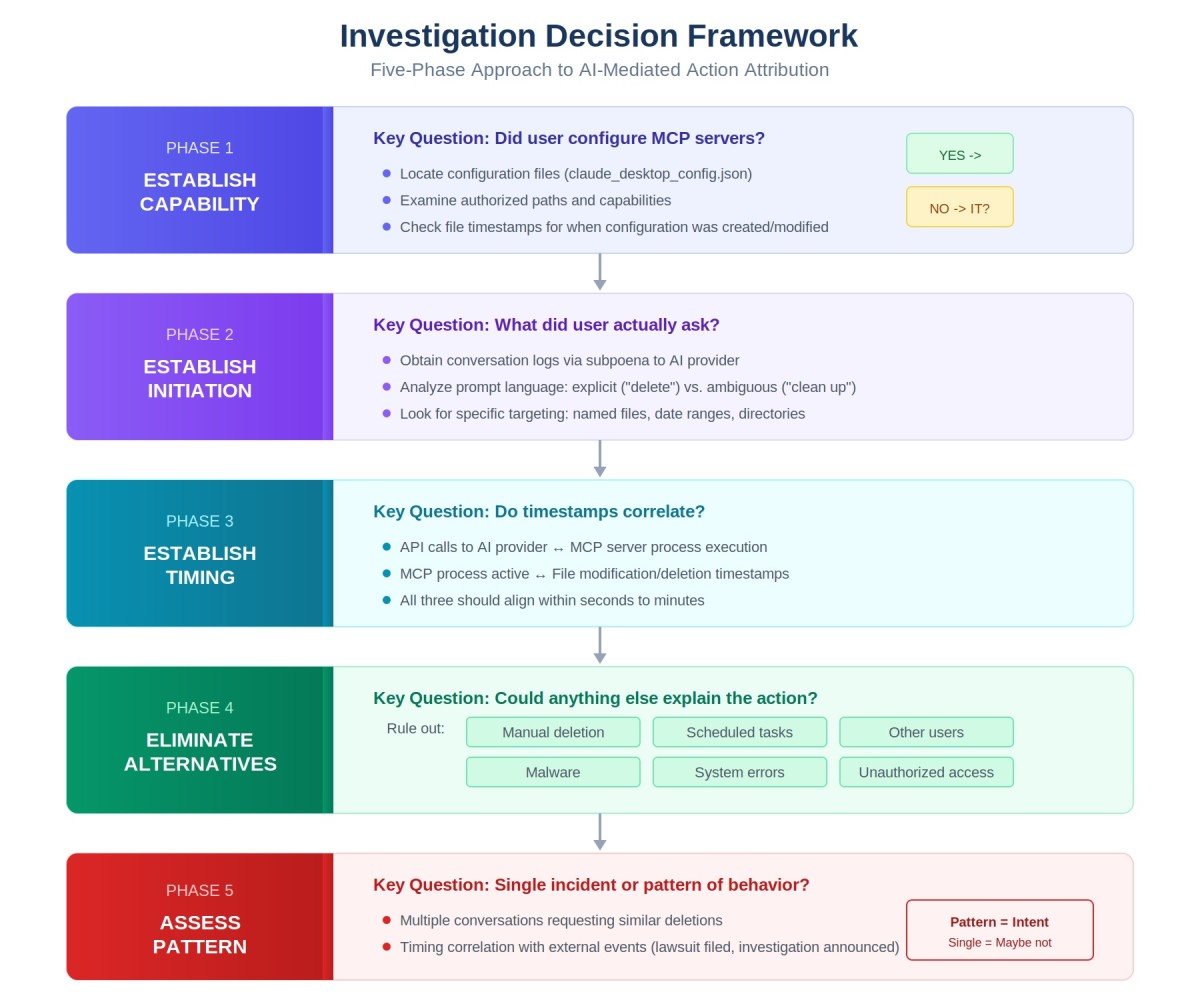
The Five-Phase Investigation Framework for AI-Mediated Actions
Phase 1: Establish Capability
Question: Was the AI system configured with the capability to perform the harmful action?
Evidence: Examine the configuration file. If the harmful action was database deletion, was a database MCP server configured? If it was file deletion, was a filesystem server configured with delete permissions enabled? This phase is often straightforward—the configuration file either enables the capability or it doesn't.
Testimony: An expert witness should explain what capabilities were enabled and what they permitted.
Phase 2: Establish Initiation
Question: Who initiated the action? Was it autonomous or user-directed?
Evidence: Examine conversation logs and process execution records. Did the user explicitly request the harmful action? Or did the AI initiate it autonomously? This distinction matters: explicit authorization shows deliberate direction; autonomous action shows delegation. Look for:
- User prompts requesting the action
- AI responses indicating it was taking action
- Whether the user was present and aware
- Process logs showing when the action occurred and whether the user was actively interacting with the system
Phase 3: Establish Timing
Question: When did the configuration happen relative to the harmful action? When did the user leave the system running autonomously?
Evidence: Establish a timeline:
- When was the MCP server configured (file modification date)?
- When was the AI system started to run autonomously?
- When did the harmful action occur (from system/database logs)?
- How much time elapsed between configuration and harm?
This timeline proves whether the user consciously enabled capabilities and then immediately created conditions for harm (suggesting intent) or enabled capabilities long ago but then left the system running carelessly (suggesting negligence).
Phase 4: Eliminate Alternatives
Question: Could anyone else have caused this harm? Could the harm have been caused by something other than the AI system?
Evidence: Examine access logs and process records to rule out:
- Other users with access to the affected systems
- Automated processes or scheduled tasks that could have caused the harm
- External attackers or unauthorized access
- Other AI systems or automation that could have been responsible
Often, the simplest explanation is that the configured AI system did exactly what it was configured to do. But you must rule out alternatives to be thorough.
Phase 5: Assess Pattern
Question: Is this an isolated incident or part of a pattern of reckless or negligent configuration?
Evidence: Look for patterns:
- Has this user configured similar dangerous capabilities before?
- Are there other incidents involving poorly-scoped MCP servers?
- Did the user receive training on MCP security?
- Did the organization have policies against such configuration?
- Were there prior warnings or near-misses?
Pattern evidence can distinguish between an isolated incident and deliberate misconduct. Multiple similar incidents show knowledge and intent; a single incident combined with lack of training or policy might show negligence.
Expanded: Evidentiary Considerations for Counsel
For attorneys handling litigation involving AI-caused harm, several unique evidentiary challenges arise when the mechanism of action involves autonomous MCP servers.
Preservation Letters for AI Tools
Standard litigation hold notices don't typically address AI configuration files and logs. Your preservation letter should specifically require:
- All configuration files for AI applications (claude_desktop_config.json, equivalent files for other platforms)
- All conversation logs with AI systems
- All MCP server logs and transaction records
- Environment variables and credentials used by MCP servers
- Backups and version-controlled copies of configuration files
- Any documentation of MCP server capabilities or policies
Be explicit in your preservation letter—many IT departments and individuals don't realize these artifacts exist or need preservation. Without explicit instruction, they may be deleted.
Early Discovery Requests
Early in discovery, before formal interrogatories, consider requesting:
- All MCP server configurations used by the subject user(s)
- All conversation logs with AI systems during the relevant timeframe
- All documentation describing MCP capabilities and policies
- Technical specifications for MCP servers involved
- Access logs to affected systems
These early requests establish the technical foundation before you take depositions. You'll know what capabilities were configured before asking defendants about their knowledge.
Expert Witness Considerations
When retaining experts for AI-caused harm cases, you need specialists in:
- MCP architecture: An expert who can explain how MCP servers work and what capabilities specific configurations enabled
- AI system behavior: An expert who can explain whether actions were autonomous or user-directed, based on conversation logs
- Standard industry practices: An expert who can testify about what safeguards should exist for MCP server configuration
- Forensic analysis: An expert who can authenticate artifacts, establish timelines, and explain what the evidence proves
Be careful about experts who come from the AI vendor. They may have conflicts of interest in minimizing the responsibility of the AI system. Seek independent experts when possible.
Admissibility Challenges
Defendants will challenge the admissibility of configuration files and conversation logs. Be prepared with arguments that they are:
- Relevant: Configuration files prove what the user authorized the AI to do—directly relevant to liability.
- Authenticated: Configuration files are typically stored on systems with reliable timestamps. Expert testimony can establish their authenticity.
- Not hearsay: Configuration files are not statements made for their truth but documents proving the user's actions and knowledge.
- Not privileged: Unlike attorney-client communications, AI configuration files are business documents, not privileged.
Expanded: The Regulatory Landscape and Agentic AI
Regulators are beginning to grapple with how autonomous AI systems fit into existing regulatory frameworks. The "My AI Did It" defense creates regulatory compliance challenges.
Regulatory Response Patterns
Several regulatory agencies are taking positions on autonomous AI:
- FTC and AI Transparency: The FTC has signaled that companies cannot hide behind "the AI did it" when they've configured autonomous systems. Companies must disclose when AI is acting autonomously and take responsibility for harms.
- SEC and Financial AI: The SEC is developing guidance on autonomous AI systems used in financial services. Configuration documentation is likely to become a standard regulatory requirement.
- Privacy Regulators and Data Protection: GDPR and similar regulations are grappling with whether autonomous AI actions can be attributed to humans. The prevailing view: if a human configured the autonomous system and didn't implement adequate safeguards, the human bears responsibility.
Emerging Compliance Requirements
Based on regulatory signals, we're likely to see new requirements for organizations deploying autonomous AI:
- AI system documentation: Organizations must document what autonomous capabilities they've authorized and why.
- Configuration transparency: Regulators may require organizations to maintain and produce configuration documentation showing what capabilities were enabled.
- Monitoring mandates: Rules requiring real-time monitoring of autonomous AI actions rather than post-hoc review.
- Accountability frameworks: Explicit assignment of responsibility for autonomous AI actions—it's not the AI, it's the human who configured it.
Parallels to Existing Regulatory Frameworks
Regulators are likely to draw parallels to existing regulatory frameworks:
- Automation and manufacturing: When factories deploy automated systems that cause injury, manufacturers remain responsible even though humans didn't directly cause the injury. The same principle likely applies to AI.
- Financial algorithms: Financial regulators have long held that firms deploying trading algorithms remain responsible for those algorithms' actions. This principle is extending to autonomous AI.
- Medical devices: FDA-regulated medical devices must demonstrate safety even when they operate autonomously. The same safety and accountability standards will likely apply to autonomous AI in healthcare contexts.
Key Takeaways: Configuration is Consent, Logs are Truth
When someone claims "My AI did it," here's what you need to know:
Configuration is Consent
When a user configures an MCP server with specific capabilities, they're explicitly consenting to those capabilities. A configuration file enabling delete_file permissions is contemporaneous evidence that the user authorized deletion. The "I didn't know the AI could delete files" defense fails when the configuration file proves they configured deletion capabilities.
Conversation Logs Are Critical
Conversation logs between the user and the AI system show what instructions were given and how the AI responded. These logs distinguish between explicit authorization ("Delete the database") and autonomous action (the AI decided deletion was appropriate). Both scenarios create liability, but conversation logs show which scenario occurred.
Timing Correlation Matters
When did the user enable dangerous capabilities? When did they leave the system running autonomously? When did the harm occur? The timeline proves whether this was deliberately set up or carelessly configured. A user who enables database deletion at 9 am and discovers harm at 5 pm made a deliberate choice to enable those capabilities.
Pattern Analysis Establishes Intent
One incident might be negligence. Multiple similar incidents suggest deliberate misconduct. If a user has repeatedly configured dangerous MCP capabilities, received training on safety, violated company policy, and still configured an autonomous system that caused harm, pattern evidence converts negligence to intentional recklessness.
Logging Gaps Are Themselves Evidence
If no MCP interaction logs exist, that's evidence of poor practices. If conversation logs are missing, that suggests deletion or cover-up. If the configuration file is newer than the harm, that's suspicious. Absence of expected evidence can be as powerful as presence of damaging evidence.
Related Resources
Want to dive deeper into AI forensics and autonomous AI liability? Check out these resources:
Comprehensive guide to investigating autonomous AI systems, configuration artifacts, and establishing liability in AI-related incidents. Published by Chapman and Hall/CRC, 2026.
Expert analysis of autonomous AI systems, MCP server configurations, and forensic investigation of AI-caused harm for litigation and regulatory matters.
Recent publications analyzing legal accountability frameworks for autonomous AI systems and emerging regulatory approaches.
Regular insights on autonomous AI, MCP servers, and emerging litigation issues. Subscribe on LinkedIn for the latest analysis on AI accountability and forensic investigation.
Stay Updated on AI Forensics and Autonomous AI Liability
Get regular insights on MCP servers, agentic AI liability, and forensic investigation delivered to your inbox.
Subscribe to Beyond the Algorithm